Get Started
Integrating RWDPay Staging API into your app or website can begin as soon as you register merchant with us, and requires three steps:
-
Register as Merchant with us. Please contact us at [email protected] to get your own
merchant account. - Configure account setting such as IP whitelist, payment restriction, return URL and status URL.
-
Obtain your API
keys and secretso RWDPay Staging API can authenticate your integration’s API requests. -
Setup your merchant side
return callback and status callbackhandling. - Test API request to confirm everything is up and running
API Overview
RWDPay Staging Connector is a convenient payment system for merchants which provides Merchants who require credit card or internet banking payment option for their online store on a single platform
The RWDPay Staging API is organized around REST. Our API has predictable resource-oriented URLs, accepts form-encoded request bodies, returns JSON-encoded responses, and uses standard HTTP response codes, authentication, and verbs.
This document is intended for software developers with knowledge and authority to integrate third party payment solutions on a Merchant's e-commerce platform. Since RWDPay Staging Connector does not require any software installation the required skills is determined by the technologies used on the Merchant’s website and the necessity to integrate the Payment Gateway with back end systems.
RWDPay Staging API Overview - Connector
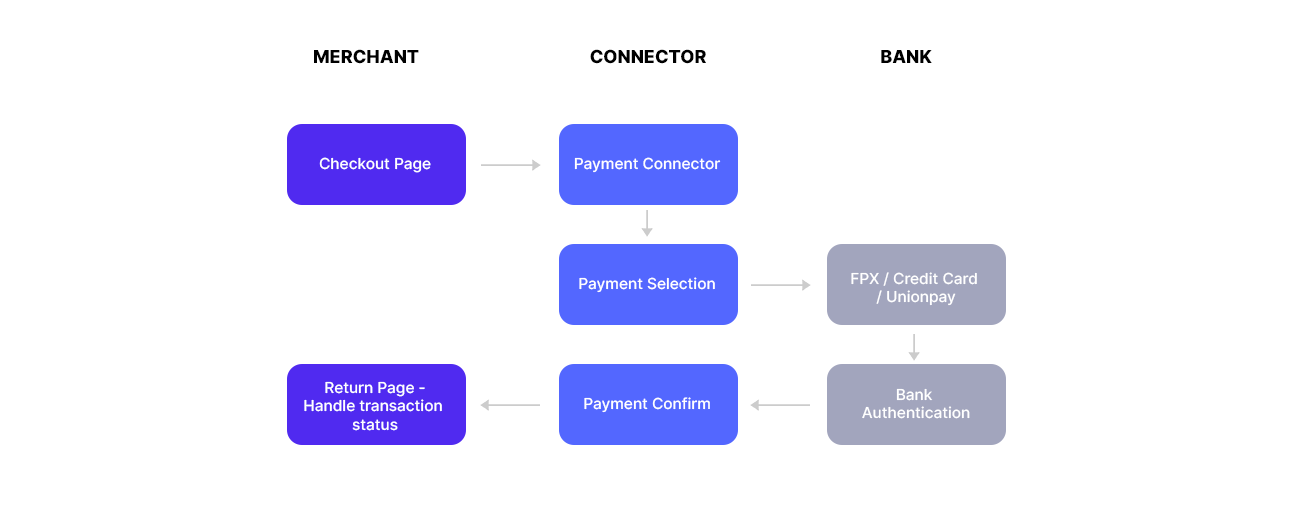
For the scope of a typical transaction, the scope begins from the confirmed checkout on Merchant side. Merchant website is in a state where all relevant information is captured and ready to present the payment transaction.
A typical transaction flow is illustrated in the diagram below:
RWDPay Staging API Overview - Status Callback
The merchant is notified of a change in the status of the order (including any payment) by an asynchronous call to an Status URL that is configured in his account. It only notifies that the status of order or payment(s) has changed. This change might or might not be relevant for the merchant.
A typical status flow is illustrated in the diagram below:

RWDPay Staging API Overview - Query
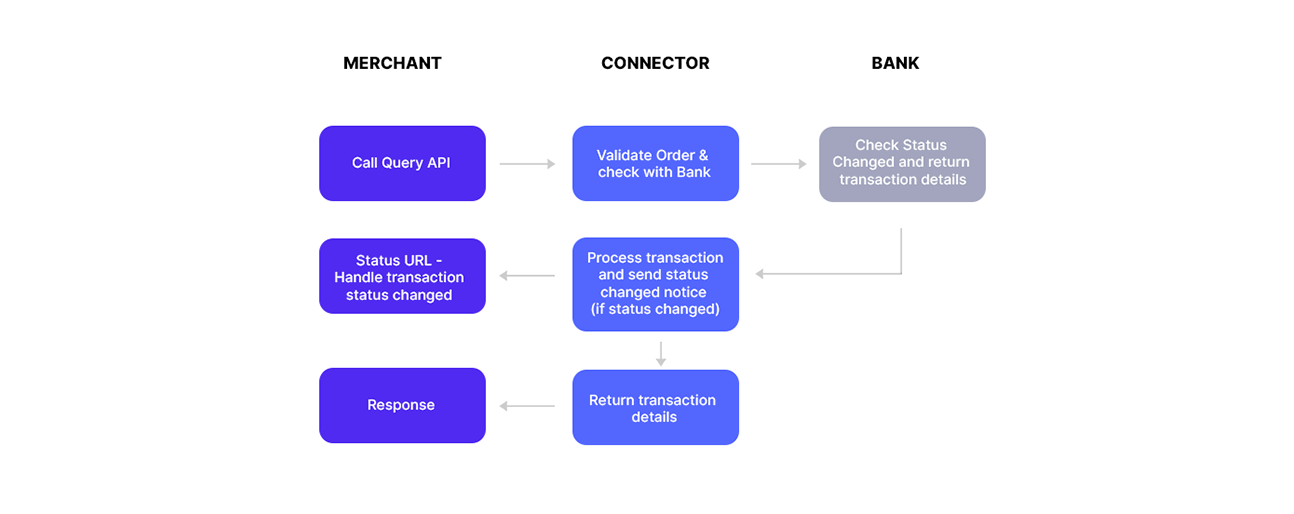
Merchant side can calls the Query API with order ID to retrieve transaction details with status information. This action will also trigger the Status Callback , it might cause double trigger to merchant site.
Possible scenario for using Query API.
- Merchant side prefer to handle transaction status changes manually
- To avoid Status Callback handling failure.
A typical Query flow is illustrated in the diagram below:
API Integration - connector
To connect to RWDPay Staging Connector, you need to make a POST call to the following url ( Please note that it will redirect to payment gateway page ) :
https://stg-api.rwdpay.com/api/payment/connector
POST PARAMETERS
| Field | Type | Mandatory | Description |
|---|---|---|---|
| tx_amt | Decimal ( 10,2 ) | Y | Payment total amount for the transaction, e.g. 10.50, 1000.15. Do not use “,” |
| tx_orderID | String | Y | A unique transaction reference generated by merchant. |
| tx_currency | Character (3) | N | Transaction Currency ( CNY , MYR or USD ). Default is MYR. Please note that staging only acceept MYR. |
| tx_name | String | Y | Buyer name. |
| tx_email | String | Y | Buyer email address. |
| tx_ref1 | String | N | Transaction reference field 1. This value will be sent to merchant without any changing. |
| tx_ref2 | String | N | Transaction reference field 2. This value will be sent to merchant without any changing. |
| tx_mercID | String | Y | Merchant API Key retrieve from merchant dashboard setting. |
| tx_hashvalue | String | Y | Transaction Hash Value - Refer to "Resource - Hash Value Algorithm". |
| tx_sub_mercKey | String | N | Transaction key for sub merchant transaction record grouping. |
| return_url | String | N | The merchant page where the user will be redirected to
upon end of transaction. This merchant page will received transaction response.
System will use merchant dashboard setting Return URL as default. This page may not be called if user simply closed the browser. System will send another callback to status URL after few minutes. |
| status_url | String | N | Where transaction status changed notification sent to via the backend.
System will use merchant dashboard setting Status URL as default. |
| tx_lang | Character (2) | N | The language will be shown on the payment window. (CN , EN) . By default is EN. |
API Integration - Query
Merchant System calls the Query function with the Merchant’s order ID to retrieve the transaction details.
To check transaction details with RWDPay Staging Query, you need to make a POST call to the following url :
https://stg-api.rwdpay.com/api/payment/query
POST PARAMETERS
| Field | Type | Mandatory | Description |
|---|---|---|---|
| tx_orderID | String | Y | A unique transaction reference generated by merchant. |
| tx_mercID | String | Y | Merchant API Key retrieve from merchant dashboard setting. |
| tx_hashvalue | String | Y | Transaction Query Hash Value - Refer to "Resource - Query Hash Value Algorithm". |
API Integration - Response
Connector response , Query response , Status response - are in the same format.
RESPONSE PARAMETERS
| Field | Type | Description |
|---|---|---|
| tx_ref | String | A transaction reference code generated by Connector |
| tx_hashvalue | String | Transaction Response Hash Value generated by Connector - Refer to "Resource - Response Hash Value Algorithm". |
| tx_date | Timestamp | Transaction created date. |
| tx_amt | Decimal ( 10,2 ) | Payment total amount for the transaction |
| tx_orderID | String | A unique transaction reference generated by merchant. |
| tx_currency | Character (3) | Transaction Currency ( CNY , MYR or USD ). |
| tx_name | String | Buyer name. |
| tx_email | String | Buyer email address. |
| tx_ref1 | String | Transaction reference field 1. This value will be sent to merchant without any changing. |
| tx_ref2 | String | Transaction reference field 2. This value will be sent to merchant without any changing. |
| tx_mercID | String | Merchant API Key retrieve from merchant dashboard setting. |
| tx_sub_mercKey | String | Transaction key for sub merchant transaction record grouping. |
| tx_lang | Character (2) | The language will be shown on the payment window. (CN , EN) . By default is EN. |
| tx_status | Character (1) | Transaction status. Please refer to "Resource - Transaction Status Code" |
| tx_remark | String | The transaction remark return from Payment Gateway |
| tx_statusChanged | boolean | A response to notify merchant site if the transaction status has been changed. |
Example
Connector API Example
{
  "tx_amt": "1",
  "tx_orderID": "60018c739d83e",
  "tx_currency": "MYR",
  "tx_hashvalue": "e288c58b85fa11f25264c37db0277e5c9837faa3",
  "tx_name": "test",
  "tx_email": "[email protected]",
  "tx_mercID": "key_5fffd2c060e2c",
  "tx_ref1": "ref1 value",
  "tx_ref2": "ref2 value",
  "tx_lang": "CN",
  "tx_sub_mercKey": "SUBKEY",
  "return_url": "http://api.mydomain.test/api/return",
  "status_url": "http://api.mydomain.test/api/status"
}
Query API Example
{
  "tx_orderID": "60018c739d83e",
  "tx_hashvalue": "e288c58b85fa11f25264c37db0277e5c9837faa3",
  "tx_mercID": "key_5fffd2c060e2c",
}
Query API Example
{
  "tx_amt": "1",
  "tx_orderID": "60018c739d83e",
  "tx_currency": "MYR",
  "tx_hashvalue": "e288c58b85fa11f25264c37db0277e5c9837faa3",
  "tx_name": "test",
  "tx_email": "[email protected]",
  "tx_mercID": "key_5fffd2c060e2c",
  "tx_ref1": "ref1 value",
  "tx_ref2": "ref2 value",
  "tx_lang": "CN",
  "tx_sub_mercKey": "SUBKEY",
  "return_url": "http://api.mydomain.test/api/return",
  "status_url": "http://api.mydomain.test/api/status"
}
Connector, Query & Status Response Example - all response are in the same format.
{
  "tx_ref": "ref_60018d5f414d1",
  "tx_hashvalue": "8c9d853a2db975558442db028ad0ef7e8e2137ac",
  "tx_date": "2021-01-15 20:41:03",
  "tx_amt": "1.00",
  "tx_orderID": "60018d5e75c59",
  "tx_name": "test",
  "tx_email": "[email protected]",
  "tx_ref1": "ref1 value",
  "tx_ref2": "ref2 value",
  "tx_mercID": "key_5fffd2c060e2c",
  "tx_sub_mercKey\t": "SUBKEY",
  "tx_status": "f",
  "tx_lang": "CN",
  "tx_currency": "MYR",
  "tx_remark": "Transaction declined. Payer has halted payment",
  "tx_statusChanged": "0",
}
Resource
Hash Value Algorithm
Hash value = SHA1 Encryption values of API SECRET, API KEY, Order ID, Order Amount
  sha1( $API_Secret . $API_Key . $orderID . $amount)
 e.g. sha1(52c9846997b466e2ad544c5d44d19388537472cfa4e5e9e60c4e37d1df00c013key_5fffd2c060e2c5ffff192672491.0)
Query Hash Value Algorithm
Hash value = SHA1 Encryption values of API SECRET, API KEY, Order ID
  sha1( $API_Secret . $API_Key . $orderID)
 e.g. sha1(52c9846997b466e2ad544c5d44d19388537472cfa4e5e9e60c4e37d1df00c013key_5fffd2c060e2c5ffff19267249)
Response Hash Value Algorithm
Response Hash value = SHA1 Encryption values of API SECRET, API KEY, Order ID, Order Amount, Response Transaction Referrence, Response Transaction Status Code
  sha1( $API_Secret . $API_Key . $orderID . $amount . $responseRef . $responseStatusCode)
 e.g. sha1(52c9846997b466e2ad544c5d44d19388537472cfa4e5e9e60c4e37d1df00c013key_5fffd2c060e2c5ffff192672491.05e9e60c4e37d1dp)
Transaction Status Code
| Error Code | Meaning |
|---|---|
| p | Pending |
| i | Processing |
| s | Success |
| f | Failed |
| e | Expired |
Transaction Language
| Code | Description |
|---|---|
| CN | Chinese |
| EN | English |
Transaction Currency
| Code | Meaning |
|---|---|
| MYR | Malaysia Ringgit |
| CNY | China Yuan |
| USD | USD Dollar |